A Weekly Prompt Review Process for Reliable AI Outputs

A prompt that worked on Monday can produce weak results by Friday. Models change, source material changes, and small edits can remove an instruction your team depended on.
A prompt review process gives recurring AI work a quality check before poor outputs reach a client, a sales sequence, or an internal decision. It replaces guesswork with a short weekly routine for testing, scoring, revising, and documenting prompts.
The goal is not to rewrite every prompt each week. It is to find the few changes that improve reliability and prevent regressions.
Key Takeaways
- Review prompts on a fixed weekly schedule, with clear owners and a small, representative test set.
- Score outputs against written criteria for accuracy, relevance, format compliance, tone, safety, and consistency.
- Change one meaningful variable at a time so the reason for improvement stays clear.
- Keep prompt versions, test results, and change notes together in a shared record.
- Roll out only prompts that meet the agreed quality bar across representative inputs.
Why a Prompt Review Process Beats One-Time Prompt Writing
Most teams begin with a prompt, get a promising output, and move on. That approach works for low-stakes personal tasks. It breaks down when a prompt supports repeatable work such as cold emails, proposal research, SEO briefs, or support replies.
A prompt can appear strong because it handled one easy input. Then a short source document, ambiguous customer request, or conflicting instruction exposes gaps. Without a review routine, people patch the prompt in the moment. Soon, several nearly identical versions live in chat histories, shared documents, and project tools.
Weekly review creates a single place to make decisions. It also separates two questions that often get mixed together:
- Did the model produce a good response for this input?
- Did the prompt perform reliably across the types of inputs we actually receive?
That distinction matters. A polished answer to one request is not proof that a workflow is dependable. Prompt evaluation commonly uses test datasets, rubrics, and regression checks for this reason, as outlined in Braintrust’s prompt evaluation guide.
A prompt should earn approval across normal, difficult, and messy inputs, not only the example that inspired it.
The review process also protects useful prompts from casual edits. If someone adds a sentence to fix one edge case, the team can test whether that sentence damaged results elsewhere.
Set a Weekly Cadence That People Will Actually Follow
A review meeting does not need to become a long committee session. For most teams, 30 to 45 minutes once a week is enough. Keep the scope narrow: review prompts that produce high-volume work, influence external communication, or caused trouble during the prior week.
Assign three roles, even if one person fills more than one.
- A prompt owner brings the current version, recent outputs, and the reason for review.
- A reviewer applies the scorecard and challenges unsupported assumptions.
- A decision owner approves, holds, or rolls back changes.
Use the same sequence every week. First, collect candidate prompts. Next, run the test set. Then score outputs and compare versions. Finally, document the decision and publish approved updates.
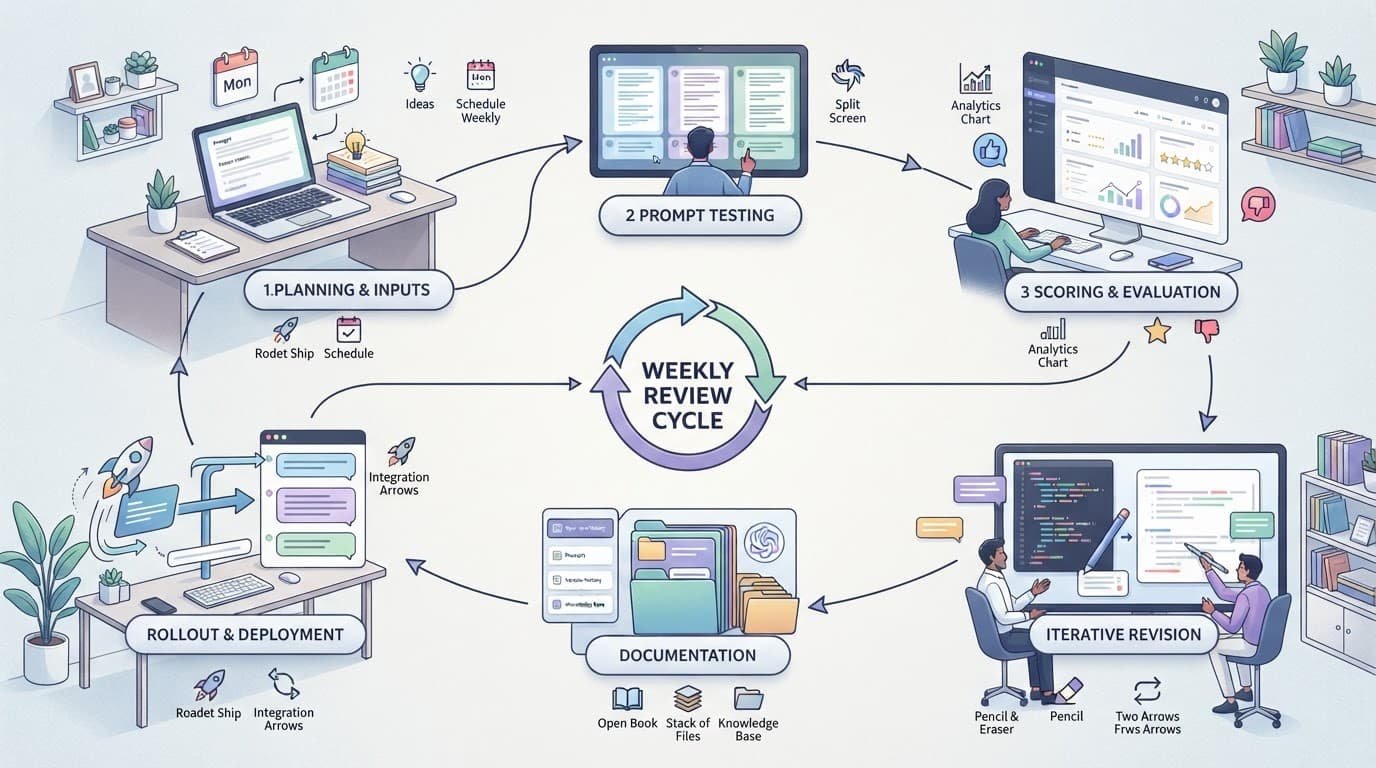
Choose candidates based on evidence, not whoever has the loudest complaint. A prompt belongs in the queue when users corrected its output repeatedly, a model update changed behavior, a new use case appeared, or output quality affected revenue, trust, compliance, or delivery time.
Keep an intake note with the prompt’s name, current version, task, model, known issue, and example input. That short record prevents a common failure: reviewing a prompt without knowing what job it must perform.
Build a Test Set That Reflects Real Work
A good test set is small enough to run every week and broad enough to reveal weaknesses. Start with 10 to 20 representative inputs. Pull them from approved past work, anonymized customer requests, or real internal tasks. Remove personal data and confidential details before placing them in a shared evaluation file.
Include more than clean, easy examples. If your prompt produces outreach emails, the set might contain a well-documented company, a company with sparse public information, a request with unclear positioning, and a case where the right action is to ask for clarification.
Group inputs by difficulty so reviewers can spot patterns.
| Input group | What it tests | Example failure |
|---|---|---|
| Standard cases | Everyday output quality | Response misses a required section |
| Edge cases | Ambiguity and incomplete context | Model invents missing facts |
| Constraint-heavy cases | Instruction following | Output exceeds word or format limits |
| Safety-sensitive cases | Boundaries and escalation | Response gives unsupported advice |
The set should change slowly. Add new examples when users encounter a recurring failure, but don’t replace the entire set each week. Stable cases let you compare prompt versions fairly.
For larger teams, maintain a smaller “smoke test” set for quick checks and a fuller regression set for weekly review. This mirrors standard evaluation practice: repeatable datasets reveal whether a revision improved the workflow or merely changed its behavior. Evidently’s overview of LLM evaluation methods explains why test cases and measurable criteria work better together than informal spot checks.
Score Outputs With Criteria Everyone Can Apply
“Looks good” is not a useful review result. It tells the next reviewer nothing about what passed, what failed, or how to judge the next version.
Use a five-point scale for each criterion. Define the ends of the scale in plain language. For example, an accuracy score of 5 means every material claim is supported by the supplied information. A 1 means the output includes major unsupported claims or misses facts that change the answer.
A reusable scorecard can include:
- Accuracy: Facts, calculations, citations, and claims match the supplied materials.
- Relevance: The response addresses the user’s request without padding or detours.
- Format compliance: The output follows required structure, length, fields, and style rules.
- Tone: Language matches the audience and task, such as direct, warm, formal, or concise.
- Safety: The response avoids disallowed content, fabricated facts, and risky instructions.
- Consistency: Similar inputs receive similarly structured and useful outputs.
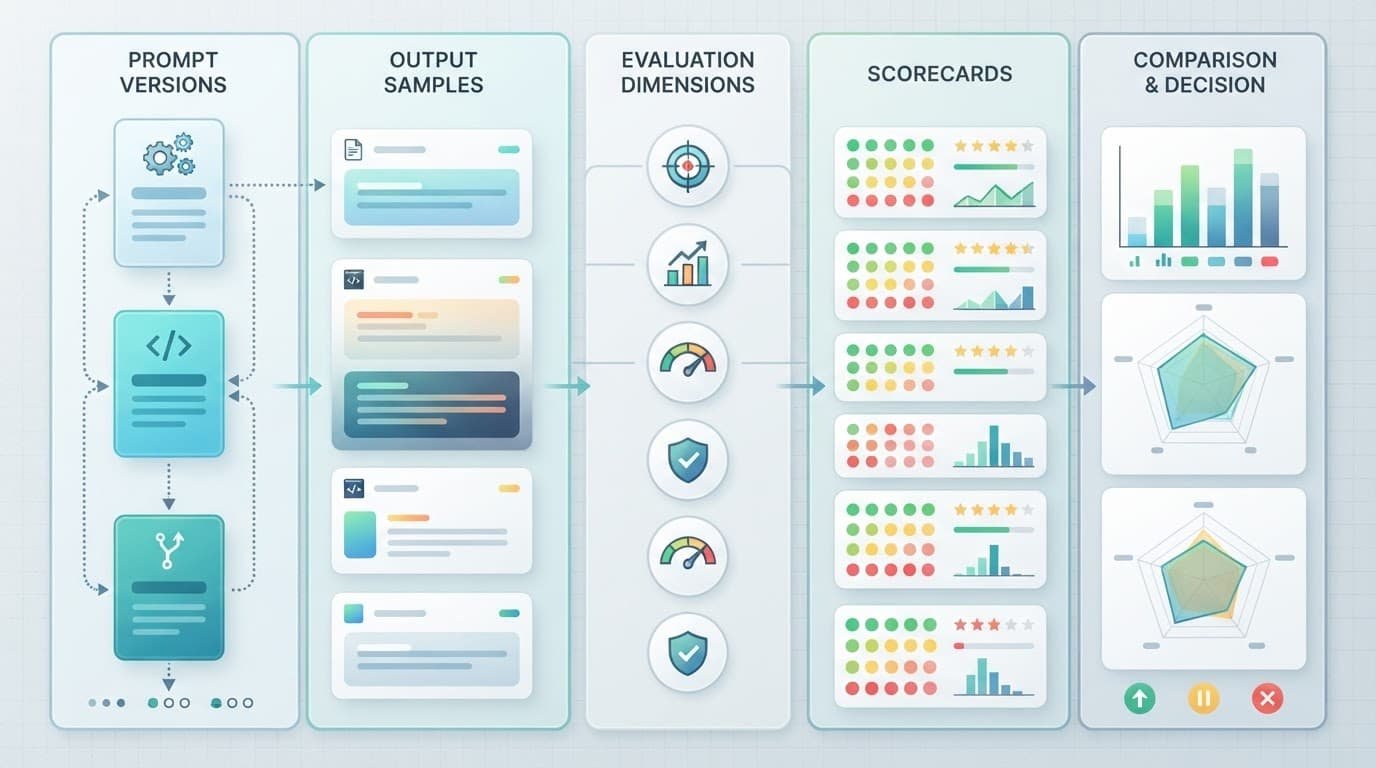
Set a pass threshold before testing. For instance, an outreach prompt might require an average score of at least 4.0, no safety score below 4, and no format failures on the test set. A single average can hide serious defects, so define minimum scores for the criteria that matter most.
Human review remains important for subjective work. Still, a second model can help score large batches if you give it a detailed rubric and periodically compare its judgments with human decisions. Guidance on LLM judges and evaluation design is useful when building that layer.
Revise Prompts Without Losing the Evidence
When a prompt fails, identify the smallest change that could address the failure. Add a missing constraint, clarify the output schema, specify what to do with unknown information, or move an important instruction nearer the end of a long prompt.
Avoid rewriting the whole prompt after every weak response. Large rewrites produce a new unknown. You may improve tone while harming accuracy, or fix format compliance while making the answer less useful.
Test the current version and the proposed version against the same inputs. Keep the model, temperature, tools, and source material consistent unless one of those settings is the thing under review. If you change several variables at once, record each of them and mark the result as a broader experiment.
A strong weekly prompt review process keeps a short change log:
| Field | Record |
|---|---|
| Version ID | A clear label, such as research-brief-v1.4 |
| Date and owner | Who made the change and when |
| Change made | The exact instruction added, removed, or reordered |
| Reason | The observed failure or new requirement |
| Test result | Scores, failed cases, and reviewer notes |
| Release decision | Approved, held for revision, or rolled back |
Store prompts in a version-controlled repository, a shared workspace with revision history, or another system that preserves prior versions. Copying prompts into scattered chats makes rollback nearly impossible.
Turn Review Results Into a Team Habit
The weekly meeting should end with decisions, not open-ended discussion. Mark each reviewed prompt as approved, needs revision, deprecated, or unchanged. Then publish the approved version where people actually use it.
A brief release note helps operations teams and knowledge workers adopt the change. State what changed, what it improves, and whether users need to adjust their inputs. For example, a revised research prompt may now request clarification when source material lacks a date or named organization.
Track a few operating signals over time. Watch the percentage of outputs that need manual correction, the number of repeated user complaints, the average score by criterion, and the time required to produce an acceptable result. These measures show whether prompt updates reduce rework.
Don’t turn every defect into a prompt edit. Some failures come from poor source data, unclear user requests, missing tool access, or a task that requires human judgment. Record those causes separately. Otherwise, prompts become overloaded with rules that don’t solve the real problem.
Make Better Outputs a Repeatable Practice
Reliable AI work comes from a prompt review process that treats prompts as maintained work assets. Test them against real inputs, score them with shared criteria, and keep a record of every meaningful change.
Weekly reviews create a useful feedback loop. Small, documented revisions are easier to trust, easier to roll back, and far more likely to produce consistent outputs when the next difficult request arrives.